

Court Reserve
ICT’s online Registration Platform
CourtReserve is our new membership & program registration platform
To use our new and improved system:
- Create an account and select your membership level. Create your head of household account first.
- Add family members and select their membership levels.
- Register for classes and programs. Programs will become available once you are a member.
Registration Assistance & Troubleshooting
When looking for classes to register for, I see ‘Registration not allowed for this event’ message
This error can mean that you do not have a Court Reserve account, you do not have the correct membership required to view available classes and register for the program, or possibly that registration for that program is not yet open.
Please verify that you have a Court Reserve account and membership and check the dates on our website to confirm when registration opens.
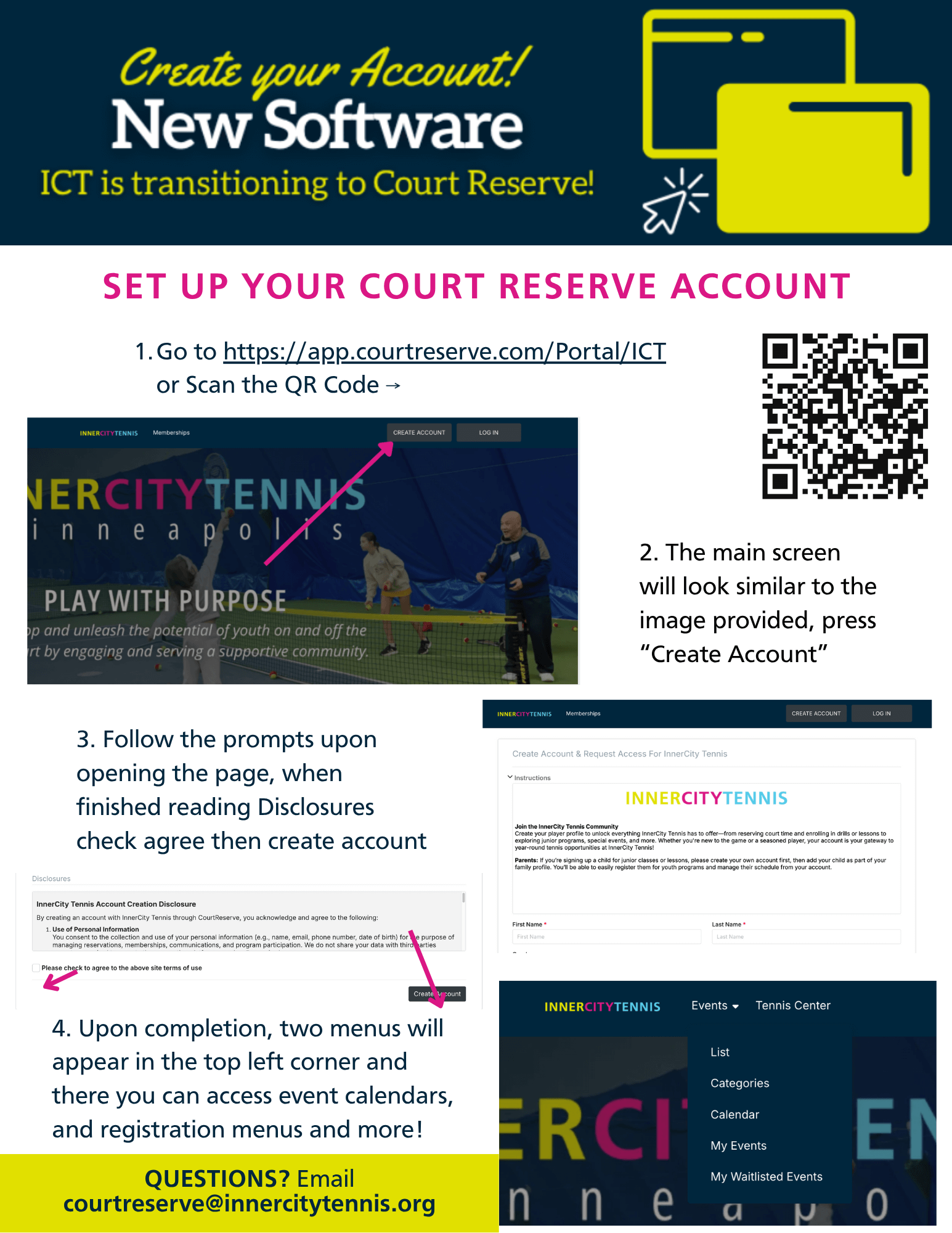
Need more information on how to create your Court Reserve account?
Click here for a guide on how to create your Court Reserve account.
The CourtReserve Mobile App
Download the CourtReserve Mobile App to simplify your InnerCity Tennis experience. With the app, you can:
- Check in quickly and easily at the tennis center scan station.
- Make payments for lessons, leagues, and services, or set up automatic billing.
- Register for all ICT programs, including drills, lessons, classes, and court rentals.
- Manage your household members and sign up youth for classes.
- Manage your membership including reviewing monthly and annual options for individuals or duos.
See below for Frequently Asked Questions. If you have any questions, please email courtreserve@innercitytennis.org
FAQs
How do I set up my Court Reserve account?
Setting up your Court Reserve account is quick and easy!
- Visit our Court Reserve Portal: Go to https://app.courtreserve.com/Online/Portal/Index/13290
- Create Your Account: Click on “Create Account.”
- Enter an email address to begin the account set-up process.
- Complete Your Profile: Fill in all required information.
- Acknowledge Agreements: You will need to review and agree to our disclosures and agreements directly within the system. Please note: For security and legal reasons, our staff cannot complete these steps on your behalf.
- After you’ve finished all of the steps as prompted, click “Complete Account” to finish your new account set-up.
Become a Member!
Choosing the right membership is key to unlocking the perks and benefits that best fit your tennis journey. The membership you choose for each individual or household should align with how you wish to participate.
Need Assistance?
- Front Desk: Staff are able to assist you with any account issues you run into, call or speak to a staff member for additional support.
- Email Support: For account setup issues, please email courtreserve@innercitytennis.org.
Already Have a Court Reserve Account?
If you have an existing Court Reserve account from another facility, you should use the same login information (email and password) to create your new account with InnerCity Tennis. If you encounter difficulties, this might be the reason – please email courtreserve@innercitytennis.org for assistance.
How will I register for classes and lessons?
With our new Court Reserve system, patrons will now need to sign up for their own classes and lessons directly online. While our staff are happy to assist and guide you through the process, they can no longer register you for classes or lessons on your behalf due to the limitations of the new system. This change empowers you with more control over your schedule!
Programs and classes that align with your membership level will be available for registration. If a class is not appearing, check your membership status.
- Note: If a class is full, you can be added to the waitlist. If a spot becomes available, you will be notified via email.
What are memberships and who needs them?
To better serve our players and provide a more comprehensive experience, we are introducing a new membership system. Going forward, an active membership is required to register for any program or class. This new structure allows us to offer exclusive benefits, ensure a consistent experience for all participants, and streamline the registration process so you can focus on your game. Choose the membership option that best aligns with how you participate in programs at ICT. More information on the membership options available can be found in the Memberships section of the FAQ.
What do I need for Permanent Court Time (PCT)?
To secure or participate in Permanent Court Time (PCT), you must have a full paid membership that aligns with our PCT membership tier. The new system strictly enforces membership requirements for PCT access.
Do I need a card on file to register for programs?
Yes. To streamline the registration process and secure your spot in programs or court time, all members must have a valid credit card on file in Court Reserve. This is required before booking courts or registering for programs. There are no exceptions to this policy.
How will guest policies be handled?
Our guest policies will be fully enforced and supported by the new Court Reserve online system. Guest passes are available for a fee, and the system will track guest usage accordingly.
What are memberships?
We are thrilled to introduce a new membership structure designed to provide our players with unparalleled access to programs, court reservations, and exclusive benefits. Becoming a member is the best way to fully participate in everything ICT has to offer, from our wide range of programs and classes to exciting league play. These tiered membership options are designed to better align with the various user groups of our tennis center. These options provide more flexibility and value!
Are memberships required?
Yes. An active membership is now required to register for any program or class. The membership you choose should align with the programs you wish to participate in. Without the correct membership, programs will appear unavailable for registration.
What types of memberships will be offered?
Here are our new membership options, each with a range of benefits tailored to your tennis journey:
- Senior Membership
- $20 Annually
- Age Restricted (50+): Exclusively for our senior players.
- Key Benefits: Includes registration for senior-focused programs, priority court reservations up to 7 days in advance, and the ability to book recurring private lessons.
- Junior Membership (Required to register for all youth classes and lessons, i.e. Cities Academy)
- $20 Annually
- Age Restricted (Youth 18 and under): Perfect for our younger players.
- Key Benefits: Includes registration for youth-focused programs like Cities Academy up to 2 months in advance, court reservations up to 3 days in advance, and the ability to book recurring private lessons.
- Standard Membership (for adult drills & leagues)
- $30 Monthly
- For One Individual: An ideal option for individual players.
- Key Benefits: Reserve courts and register for drills at discounted member rates and participate in ICT Leagues.
- Standard Duo Membership
- $54 Monthly
- For Two Household Members: A great value for two players living in the same home.
- Key Benefits: All Standard Membership benefits are included, such as discounted rates for courts and drills, plus participation in ICT Leagues.
- Premium Membership
- $65 Monthly
- For One Individual: Elevate your tennis experience with priority access and special perks.
- Key Benefits: All Standard Membership benefits, plus priority registration for programs, court reservations up to 14 days in advance, one complimentary annual racket restringing, and a 20% discount on all pro shop services.
- Premium Duo Membership
- $117 Monthly
- For Two Household Members: The ultimate membership for two players, offering top-tier benefits.
- Key Benefits: All Standard Membership benefits, plus priority registration, court reservations up to 14 days in advance, one complimentary annual racket restringing, and a 20% discount on all pro shop services.
- Public (Non-Member Account)
- Free
- Allows registration for public events and programs, and provides limited court access.
- Key Benefits: Register for Youth Programs (such as Cities Academy, Tennis in the Parks, and Super Saturdays) & Adult Community Programs (Step 1 or 2 Lessons, and NTRP 2.5 Drills). Reserve a court and register for drills up to 24 hours in advance. Book non-recurring private lessons.
Why is there a new membership structure?
Our new tiered membership system replaces the previous “annual registration” fee to provide a more comprehensive and flexible experience tailored to how you play at InnerCity Tennis. This structure allows us to offer exclusive benefits, streamline the registration process, and provide more value to all members.
How do I sign up for my child or another family member?
When you create your Court Reserve account, you are creating a household account. To register your child or another family member, you will need to add them to your profile.
- Step 1: Log in to your Court Reserve account.
- Step 2: Click on your profile icon in the top right corner and select ‘Family Members.’
- Step 3: Click ‘Add Family Member’ and enter their information.
- Note: If you get a message that says ‘a user with this email already exists,’ it means they have an existing profile. Please email courtreserve@innercitytennis.org for assistance with merging or linking the accounts.
Why can’t I register my child for a Junior Membership?
Junior Memberships are age-restricted and must be purchased under the child’s profile. However, you must first add your child to your family account (see above). Once your child is added, you will be able to purchase the Junior Membership on their behalf and register them for age-appropriate classes.
I’m having trouble logging in. My email is not recognized.
This is a common issue, often due to an existing account. Please check your email inbox for an email from Court Reserve with a link to activate your account. If you cannot find this, please email courtreserve@innercitytennis.org with your full name and email address so we can locate your profile and help you gain access.
How do I register for upcoming programs?
To register for any upcoming programs, you will need to use our new system, Court Reserve. Please ensure your account is set up and any old balances are resolved prior to registration. Once you have created an account you are able to view and register for any classes and programs that align with the membership level you have selected.
How do I find and register for adult drills?
To register for drills, you must first have an active Standard or Premium membership. Once you have a valid membership, you can find and sign up for all available drills under the ‘Events’ or ‘Programs’ section of Court Reserve.
How can I find a sub for my league team?
Please email the league coordinator with your team’s name and the date you need a sub. They will assist you with finding a replacement from the league’s sub roster. Direct contact information for league coordinators can be found on our Leagues webpage.
Why am I getting a ‘Registration not allowed for this event’ notification?
 This error typically means one of two things: either registration for that program is not yet open, or you doe not have the correct membership required to access the program.
Please verify that you have purchased the relevant membership and check the registration dates on our website.
My child is registered for a class, but I need to change the day. Can you do this for me?
Yes, we can assist with this. Please email info@innercitytennis.org with your child’s name, the program name, and the dates/times of the classes you wish to switch. Please note that switches are subject to availability in the desired class.
How do I know if I have auto-pay turned on for my membership?
Your membership is set up for automatic recurring billing by default. To verify this, go to your ‘Membership’ section in Court Reserve. If it shows a ‘Next Billing Date,’ your auto-pay is active. You can also view past and future payments in the ‘Invoices’ section.
Why was I not prompted to enter my credit card information?
All members must have a valid credit card on file before registering for programs or court time. If you were not prompted to enter a card, it is likely already on file from a previous transaction. You can manage your payment profiles in the ‘Payments’ section of your account.
What happens to my outstanding balances or credits from Club Automation?
If you currently have any outstanding balances or credits on your Club Automation account, please take steps to resolve them as soon as possible. Balances and credits will NOT be transferred over to the new Court Reserve system.
What if I have credits from the previous system (Club Automation)?
Credits from the Club Automation system will NOT be transferred to Court Reserve. To use these credits, you must resolve them with our front desk staff prior to registering for any programs in Court Reserve. You can check your Club Automation account or email courtreserve@innercitytennis.org to see if you have an outstanding credit.
Can I register for programs if I have an outstanding balance?
No. Members with an outstanding balance in Club Automation will not be allowed to register for programming in the new Court Reserve system until their Club Automation balance is fully resolved.
How do I check if I have a balance or credit?
If you are unsure if you have a balance or credit on your current Club Automation account, please inquire with our front desk staff during business hours or email courtreserve@innercitytennis.org for assistance.